Burger Bar
 Burger Bar
Burger Bar
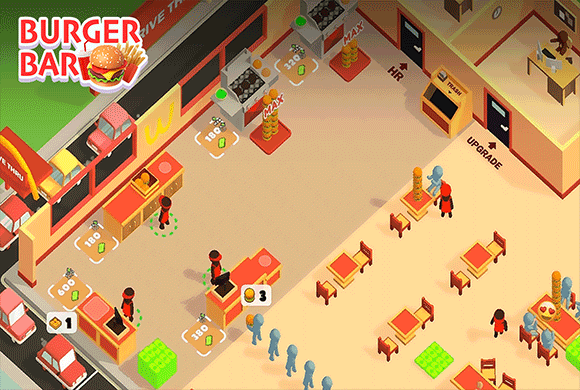
Burger Bar starts on an empty street-side plot. Collect the first cash, open service stations, add a takeaway counter, then raise staff and player upgrades as the shop gets busy.
Burger Bar: how to play
Collect the initial funding before building the restaurant
Burger Bar has no separate home screen. The first instruction is “Collect initial funding,” with the character standing beside a small cash area on the empty street-side plot.
Move onto the marked money to collect it, then follow the next floor marker. Spend that opening cash on the first useful station. The upgrade menus come later.
Serve customers, collect the earnings and reinvest
Once the counters and burger equipment are open, customers enter and wait while staff prepare orders. Finished orders leave cash to pick up, which pays for the next table, machine or room.
Walk through the earnings often, but keep an eye on the line. Serve, collect, buy, then serve again. Do not walk away from a busy counter as soon as one cash pile appears.
Open the delivery counter as a second service route
The office side of the restaurant shows “Create a Takeaway Counter.” Move onto the marked build area to add that path. It is a real service route, not decoration.
A delivery timer appears beside the instruction. Build the counter when the main shop can still serve current customers. If the indoor line is already backing up, fix that first.
Improve the workers when service becomes the bottleneck
Staff Upgrade lists Speed for 200, Stack for 100 and another Staff for 3,000. Each row also has a Free advertisement option.
Buy Speed when customers wait on slow movement, Stack when workers make too many small trips, and another Staff only when the shop has enough active stations to keep that worker busy.
Upgrade your own route between cash, counters and rooms
Player Upgrade is a different panel from staff. It lists Speed for 300, Stack for 200 and Profit for 600, with Free ad buttons beside the cash prices.
Speed shortens long walks across a bigger restaurant, Stack cuts repeat collection trips, and Profit raises the return from each service cycle. Pick the one that matches the delay you can see in the shop.
The restaurant growth loop
| Phase | Player action | What it unlocks |
|---|---|---|
| Fund | Collect the highlighted startup cash | First restaurant station |
| Build | Stand on a marked purchase area | Counters, tables, machines and rooms |
| Serve | Keep customers moving through orders | Cash around the active shop |
| Collect | Walk through completed earnings | Budget for the next purchase |
| Expand | Add takeaway and office functions | More income routes and upgrades |
| Improve | Raise staff or player abilities | Faster, larger service cycles |
The empty plot turns into a shop with customers, staff and several jobs at once. Watch the floor: more people and more stations means the loop is working.
Which upgrade should come first?
- Long walks between rooms: Player Speed.
- Too many trips to move the same resource: Player or Staff Stack.
- Customers waiting while workers move: Staff Speed.
- Shop runs smoothly but income is slow: Profit.
- Several idle stations with too few workers: save for another Staff member.
Ad buttons give a free path, but cash upgrades also work. Use whichever you prefer. None of the panels force an ad to keep building and serving.
Avoid expanding faster than service can handle
A new counter only helps if customers are still being served. If the main line is already backing up, raise staff speed or capacity before opening another room. At 395 coins the restaurant, office, takeaway objective and both upgrade panels can already be open — the job shifts from startup chores to running a busy shop.